
Spring Profile
개발을 하다보면 실제 운영 환경에 올리는 애플리케이션 설정과 개발 환경에 올리는 설정이 다를 때가 있습니다. 예를 들어, 개발 환경에서는 Docker Container를 사용해서 개발을 진행하고 실제 운영 환경은 클라우드 또는 온-프레미스를 이용하기도 합니다. 바로 이 때 이용하는 것이 Spring Profile 입니다.
Spring Profile은 스프링 프레임워크에서 애플리케이션의 환경 설정을 구분하기 위한 기능입니다. Profile은 애플리케이션을 실행할 때 선택할 수 있습니다. 예를 들어, 개발 환경에서는 'dev' 프로파일을 선택하고 운영환경에서는 'prod' 프로파일을 선택할 수 있습니다.
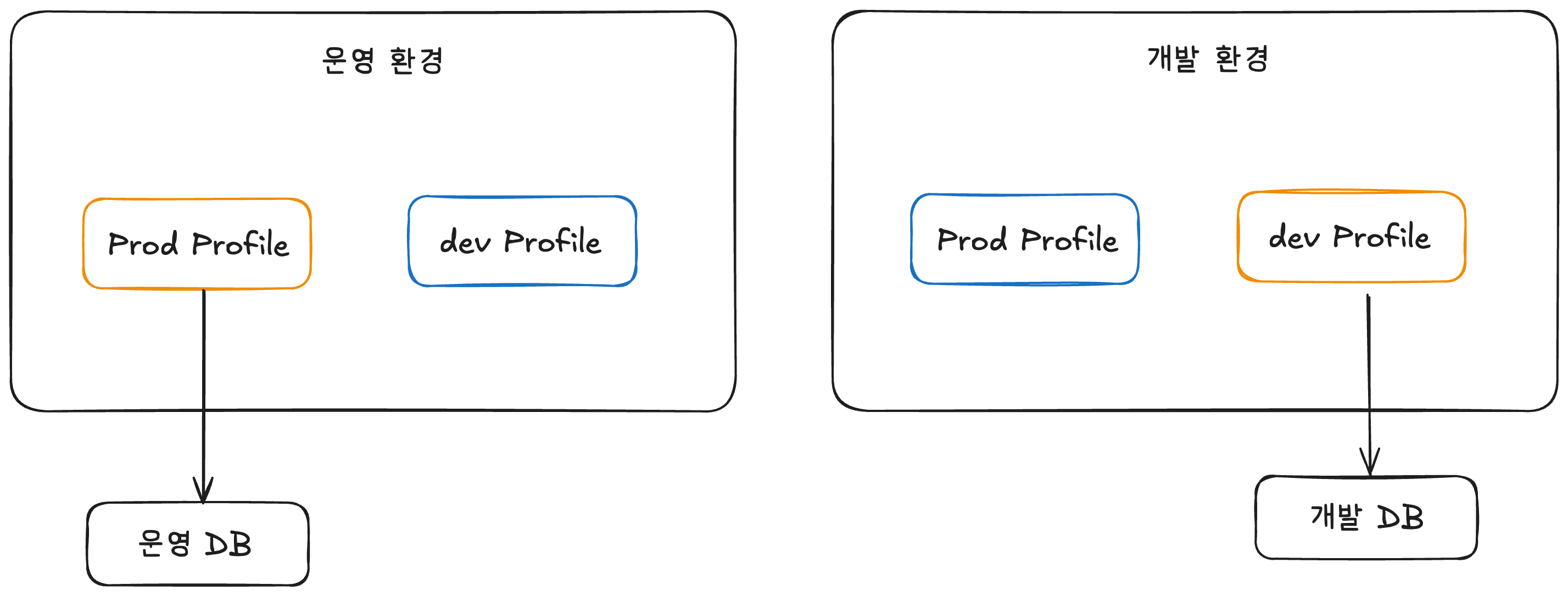
Spring Profile로 애플리케이션 환경 분리하기
스프링 프레임워크 애플리케이션을 살펴보면 /src/main/resources 하위에 application.properties 또는 application.yaml 파일이 존재합니다.
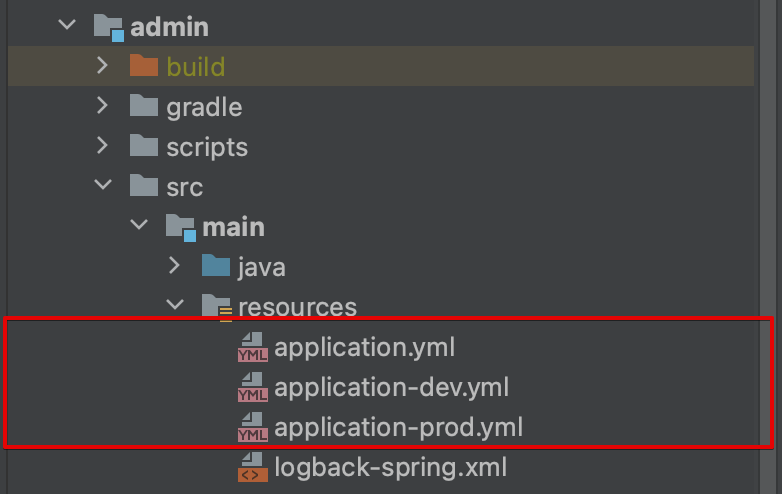
환경 별로 설정 파일을 만들려면 application-[이름].yml 형식으로 파일을 생성합니다. 상기 이미지를 보면 application.yml에서는 기본적으로 어떤 프로파일을 사용할 것인지 설정합니다. application-dev.yml은 개발 환경에서 사용할 설정 파일입니다. application-prod.yml는 운영 환경에서 사용할 설정 파일입니다.
application.yml을 살펴보면 기본 프로파일로 어떤 설정 파일을 사용할 것인지 선택하고 있습니다. 만약 따로 설정을 하지 않는다면 IDE 내 설정이나 Jar 파일 실행 시 java -jar -Dspring.profiles.active=dev app.jar 명령어로 프로파일을 지정할 수 있습니다.
# application.yml

spring:
  profiles:
    active: dev
앞에서 설명한 것처럼 application-[이름].yml 형식으로 파일 이름을 설정하면 자동적으로 JVM이 프로파일을 설정할까요? 그렇지는 않습니다. JVM에서 환경 별로 application.yml을 인식시키기 위해서는 yml 내에서 프로파일 이름을 지정해야 합니다.
Spring boot 2.4 이후부터는 spring.config.activate.on-profile 을 사용해서 프로파일 이름을 지정할 수 있습니다.
# application-dev.yml

server:
  port: 8080
spring:
  config:
    activate:
      on-profile: dev
  datasource:
    url: jdbc:mysql://localhost:3307/impostor
    username: root
    password:
    driver-class-name: com.mysql.cj.jdbc.Driver
  jpa:
    hibernate:
      ddl-auto: create-drop
    properties:
      hibernate:
        show_sql: true
        format_sql: true
        use_sql_comments: true
  session:
    redis:
      flush-mode: ON_SAVE
  data:
    redis:
      host: 127.0.0.1
      port: 6380
cloud:
  aws:
    s3:
      endpoint: http://localhost:4566
      bucket: local-bucket
      region: ap-northeast-2
    credentials:
      secretKey: secretKey
      accessKey: accessKey
    stack:
      auto: false
# application-prod.yml
server:
port: 8080
spring:
config:
activate:
on-profile: prod
datasource:
url: ${DB_URL}
username: ${DB_USERNAME}
password: ${DB_PASSWORD}
driver-class-name: com.mysql.cj.jdbc.Driver
jpa:
hibernate:
ddl-auto: validate
properties:
hibernate:
show_sql: true
format_sql: true
use_sql_comments: true
session:
redis:
flush-mode: ON_SAVE
data:
redis:
host: ${REDIS_HOST}
port: 6379
cloud:
aws:
s3:
endpoint: ${AWS_S3_ENDPOINT}
bucket: ${AWS_S3_BUCKET}
region: ${AWS_S3_REGION}
credentials:
secretKey: ${AWS_S3_SECRET_KEY}
accessKey: ${AWS_S3_ACCESS_KEY}
stack:
auto: false
Profile 테스트 해보기
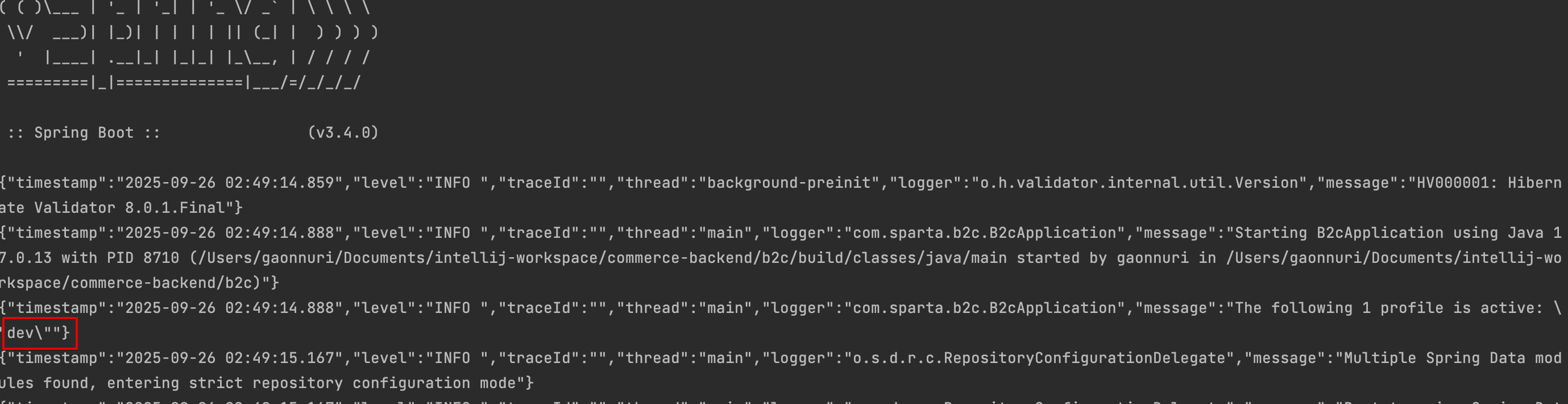
설정 한 내용을 토대로 애플리케이션을 실행해보면 아래 로그와 같이 dev 프로파일이 실행된 것을 볼 수 있습니다.
참고 링크
https://tear94fall.tistory.com/14
[Spring] profile별 환경 분리 하기
Spring profile별 환경 분리 하기 1. 환경을 분리해야 하는 이유? 실무에서 개발할때는 운영 환경에 테스트를 할수는 없습니다. 테스트시에 혹여나 데이터를 잘못 건드리는 경우는 장애를 초래 할수
tear94fall.tistory.com
https://wonyong-jang.github.io/spring/2022/08/11/Spring-Profile.html
[Spring] application profile 환경 별 설정 분리 - Data Engineer
Spring Profile는 어플리케이션 설정을 특정 환경에서만 적용되게 하거나, 환경 별(local, develop, production 등)로 다르게 적용 할 때 사용 한다. Spring boot 2.4 버전이 릴리즈 되면서 application.properties, applic
wonyong-jang.github.io
https://devscb.tistory.com/258#google_vignette
spring profile, 스프링 profile, spring 환경별 구성 다르게 하기, spring 설정방법, spring.profiles.active
spring profile이란스프링 프로파일(Spring Profile)은 스프링 프레임워크에서 애플리케이션의 환경 설정을 구분하기 위한 기능입니다.프로파일은 애플리케이션을 실행할 때 선택할 수 있습니다.예를
devscb.tistory.com
'Spring' 카테고리의 다른 글
| [Spring] 동시성 처리 방법 (0) | 2025.10.07 |
|---|---|
| [Springboot] @RestControllerAdvice 와 Swagger 충돌 문제 (0) | 2025.08.27 |
| [QueryDSL] JPAQuery vs JPAQueryFactory (2) | 2025.08.14 |
| [Spring Data JPA] JpaRepository getById() vs findById() 차이 (1) | 2025.08.10 |
| [Springboot] JPA 양방향 매핑 시 ToString 메소드 StackOverflowError 문제 (0) | 2025.08.01 |


